
In my previous post, I explained how to implement seat reservation with jQuery. In this post, you will see how to use it in ASP.NET project to save and retrieve data from database. It can be used in online Bus, flight, hotel, exam support, cinema and ticket booking system.
DB Structure:
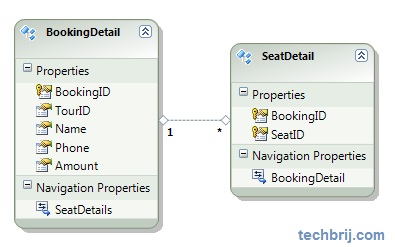
There are two tables:
BookingDetail Table: Seat owner information
SeatDetail Table: To save booked seats information. One user can select multiple seats, so separate table is used. There is no primary key in this table so you need to create insert stored proc. It will be mapped in EF.
CREATE PROCEDURE dbo.SP_SeatDetails_Insert
	(
	@BookingID int,
	@SeatID int
	)
AS
	insert into SeatDetails (BookingID,SeatID) values (@BookingID,@SeatID)
Setup Entity Data Model:
First Create database and stored proc as mentioned above.
Right click on Project > Add New Item > Select ADO.NET Entity Data Model >(name: Model.edmx) > Add
Select "Generate from database" > Next > Select Database >(save entity connection string...: StarBusEntities1)> Next
Select Both tables and Stored proc > (Model Namespace: StarBusModel) > Finish
You will get the above db structure - screen shot and get tables in edmx file.
Now Right click on SeatDetail > Stored Procedure Mapping
Expand "Select Insert Function" in 'Mapping Details' dialog and select "SP_SeatDetails_Insert" and map with same property name.
Now save it.
Display Booked Seat:
Add new page and use code from my previous article.
Before going code, It is assumed seat charge and tourid comes from different tables and available on server side.
Now, our first object is to retrieve data from database and show booked seat in the page.
 StarBusModel.StarBusEntities1 objEntities = new StarBusModel.StarBusEntities1();
 int tourID = 1;
 int chargePerSeat = 100;
    void BindSeats(){
        txtAmount.Text = chargePerSeat.ToString();
        string sel =  String.Join(",",(from b in objEntities.BookingDetails
                   join s in objEntities.SeatDetails on b.BookingID equals s.BookingID
                   where b.TourID == tourID
                   select s.SeatID).ToArray());
        ClientScript.RegisterStartupScript(this.GetType(), "Init", "init([" + sel + "]);",true);

    }
We have defined calling of init method from server side. Remove calling of init from client side and add following in init method to set charge per seat.
chargePerSeat = $('#<%=txtAmount.ClientID %>').val();
Save Selected Seat:
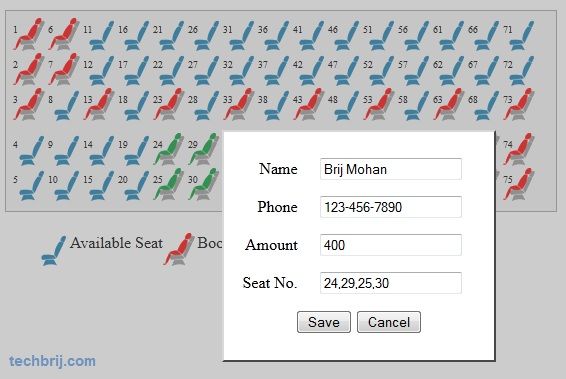
After selecting seats, when user clicks on button, A modal popup will be displayed with calculated price. User gives name, phone and click on save button, seat information will be saved in database.
To open pop-up:
 $('#btnShowNew').click(function () {
            var str = [];
            $.each($('#place li.' + settings.selectingSeatCss + ' a'), function (index, value) {
                str.push($(this).attr('title'));
            });
            if (str.length > 0) {
                $('#<%=txtAmount.ClientID %>').val(str.length * chargePerSeat);
                $('#<%=txtSeatNo.ClientID %>').val(str.join(','));
                ShowPopup();
            }
            else {
                alert('Select atleast one seat');
            }
        })

        function ShowPopup() {
            $('#mask').show();
            $('#<%=PanelPop.ClientID %>').show();
        }
        function HidePopup() {
            $('#mask').hide();
            $('#<%=PanelPop.ClientID %>').hide();
        }
HTML:
 <div id="mask">
</div>

<asp:Panel ID="PanelPop" runat="server" Style="display: none; cursor: pointer; width: 250px;
        z-index: 111; background-color: White; position: absolute; left: 35%; top: 12%;
        border: outset 2px gray; text-align: center; padding: 10px" class="popUp">
        <p>
            <asp:Label ID="Label1" runat="server" Text="Name" AssociatedControlID="txtName"></asp:Label>
            <asp:TextBox ID="txtName" runat="server"></asp:TextBox>
            <asp:RequiredFieldValidator ID="RequiredFieldValidator1" ControlToValidate="txtName" runat="server" Display="Dynamic"  ErrorMessage="Name is required.">*</asp:RequiredFieldValidator>
        </p>
        <p>
            <asp:Label ID="Label2" runat="server" Text="Phone" AssociatedControlID="txtPhone"></asp:Label>
            <asp:TextBox ID="txtPhone" runat="server"></asp:TextBox>
            <asp:RequiredFieldValidator ID="RequiredFieldValidator2" ControlToValidate="txtPhone" runat="server" Display="Dynamic"  ErrorMessage="Phone is required.">*</asp:RequiredFieldValidator>
        </p>
        <p>
            <asp:Label ID="Label3" runat="server" Text="Amount" AssociatedControlID="txtAmount"></asp:Label>
            <asp:TextBox ID="txtAmount" runat="server" ReadOnly="true" ></asp:TextBox>
            <asp:RequiredFieldValidator ID="RequiredFieldValidator3" runat="server" ControlToValidate="txtAmount" Display="Dynamic"  ErrorMessage="Amount is required.">*</asp:RequiredFieldValidator>
        </p>
        <p>
            <asp:Label ID="Label4" runat="server" Text="Seat" AssociatedControlID="txtSeatNo"></asp:Label>
            <asp:TextBox ID="txtSeatNo" runat="server" ReadOnly="true"></asp:TextBox>
        </p>
        <p>
            <asp:Button ID="btnSave" runat="server" Text="Save" OnClick="btnSave_Click" />
            <input type="button" id="btnCancel" value="Cancel" onclick ="HidePopup();" />
        </p>
    </asp:Panel>
CSS:
#mask
        {
            position: fixed;
            left: 0px;
            top: 0px;
            z-index: 4;
            opacity: 0.4;
            -ms-filter: "progid:DXImageTransform.Microsoft.Alpha(Opacity=40)"; /* first!*/
            filter: alpha(opacity=40); /* second!*/
            background-color: gray;
            display: none;
            width: 100%;
            height: 100%;
        }
.popUp label
        {
            width: 4em;
            float: left;
            text-align: right;
            margin-right: 0em;
            display: block;
        }
To save information:
 protected void btnSave_Click(object sender, EventArgs e)
    {
        StarBusModel.BookingDetail objBooking = new StarBusModel.BookingDetail();
        objBooking.TourID = tourID;
        objBooking.Name = txtName.Text;
        objBooking.Phone = txtPhone.Text;
        objBooking.Amount = Convert.ToDecimal(Request.Form[txtAmount.ClientID]);
        string[] seats = Request.Form[txtSeatNo.ClientID].Split(new char[] { ',' });
        for (int i = 0; i < seats.Length; i++)
            objBooking.SeatDetails.Add(new StarBusModel.SeatDetail() { SeatID = Convert.ToInt32(seats[i]) });
        objEntities.BookingDetails.AddObject(objBooking);
        objEntities.SaveChanges();
        BindSeats();
    }
Hope, It helps. If you have any query, put in below comment box.